
English
cBlock
cBlock is a browser extension that hides Chinese content on any website.
Install
| Chrome | Firefox |
|---|---|
 |  |
Permissions
| Permission | Use |
|---|---|
storage | Stores cBlock’s settings and the results of website lookups |
activeTab | Lets the popup find the current tab and its website |
declarativeNetRequest | Blocks access to China-linked websites |
http://*/*, https://*/* | Finds and hides Chinese content on all websites |
How cBlock works
cBlock uses the four methods below to hide Chinese content and block connections to China-linked websites. For details, see How cBlock Decides.
| Method | What it does |
|---|---|
| Text filter | Hides Chinese text and links to China-linked websites |
| Name filter | Hides items that mention a China-linked company or product (off by default) |
| Website scripts | Checks sellers, developers, and more that text alone can’t tell, website by website, and hides them |
| Domain block | Blocks China-linked websites before they load |
Popup
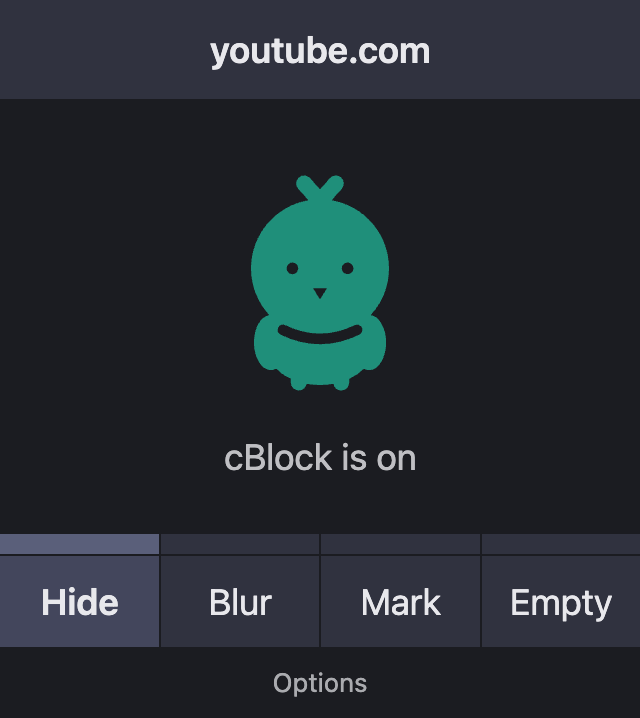
| Item | What it does |
|---|---|
| Website name | The website in the current tab |
| On/off switch | Turns cBlock on or off for this website. Shift-click turns it on or off for all websites |
| Status | Shows whether cBlock is on or off, or not available on this page |
| Default for all websites | The mode used on all websites |
| Mode for this website | The mode used only on this website. Click it again to go back to the default |
| Options | Opens the Options page |
Options
| Item | What it does |
|---|---|
| Turn on cBlock | Turns cBlock on or off for all websites |
| Show the hidden count on the toolbar icon | Shows on the toolbar icon how many items were hidden in the current tab |
Default mode
| Item | How blocked items look |
|---|---|
| Hide | Items are not shown |
| Blur | Items are shown blurred (default) |
| Mark | Items are outlined with a dashed line and stay usable |
| Empty | Items are hidden, but their space stays blank so the layout doesn’t break |
What to hide
| Item | What it does |
|---|---|
| Chinese text | Hides posts, articles, and other items with Chinese text |
| └ Show Traditional Chinese | Hides only Simplified Chinese |
| Names of China-linked companies and products | Hides items that mention a China-linked company or product (off by default) |
| └ Each genre | The genres to hide |
| └ Toggle All | Turns all genres on or off |
| Block pages of China-linked websites | Blocks China-linked websites before they load |
| Links to China-linked websites | Hides links to China-linked websites |
China-linked websites are websites of companies founded or based in China, and websites whose domain ends in
.cn,.中国, or.中國.
Website lookups
- All are off by default.
- When turned on, cBlock asks the website you’re on about sellers, developers, authors, and more, to tell more accurately whether they’re based in China.
- See the Privacy Policy for details.
- The X and pixiv lookups use private APIs, so the website may restrict your account. Use them at your own risk.
| Website | What cBlock asks | What it hides |
|---|---|---|
| Amazon | Seller’s address, phone, and name | Products by sellers based in China |
| Steam | Game’s developer and publisher | Games by studios based in China |
| X | Author’s account location and connection source | Posts by accounts based in China |
| pixiv | Artist’s profile | Works by artists based in China |
Mode per website
- You can set a mode per website. Enter one website and mode per line.
- Set the mode to one of these four:
hideblurmarkempty
- Websites not in the list use the default mode.
text
youtube.com hide
news.yahoo.co.jp blur
news.example.com mark
cBlock runs on a listed website even if it is turned off on the parent domain. The more specific domain wins, so in the example above,
news.example.comruns withmarkeven ifexample.comis in Websites to turn off below.
Websites to turn off
Enter one website per line where cBlock should not run. In the example below, www.example.com is turned off too.
text
example.com